Write Up – Press Me If You Can
Write-up bisa dibaca langsung di halaman ini atau diunduh sebagai file PDF.
Write Up – Press Me If You Can
Write Up – Press Me If You Can
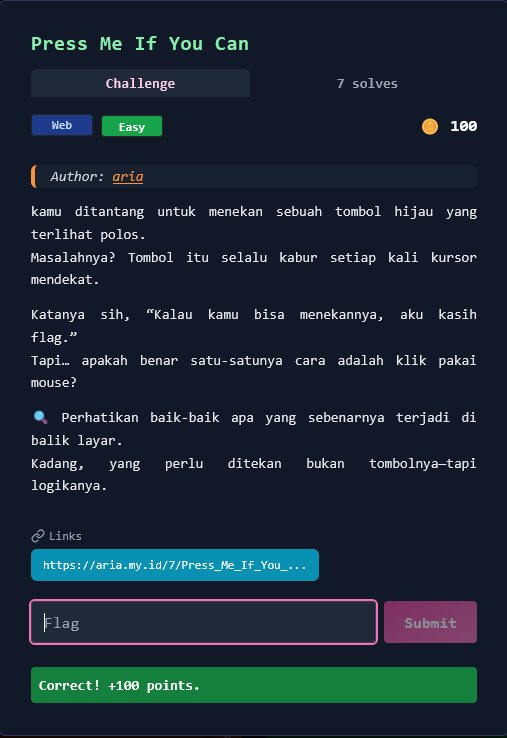
Challenge Overview
Category: Web
Difficulty: Easy
Points: 100
Author: aria
Kamu ditantang untuk menekan sebuah tombol hijau yang terlihat polos. Masalahnya? Tombol itu selalu kabur setiap kali kursor mendekat. Katanya sih, "Kalau kamu bisa menekannya, aku kasih flag." Tapi… apakah benar satu-satunya cara adalah klik pakai mouse?
🔍 Perhatikan baik-baik apa yang sebenarnya terjadi di balik layar. Kadang, yang perlu ditekan bukan tombolnya—tapi logikanya.
Target URL: https://aria.my.id/7/Press_Me_If_You_Can.php
Format flag:
FGTE{...}
Given Information
Target Website
- URL: https://aria.my.id/7/Press_Me_If_You_Can.php
- Element: Green button with ID
btnand text "PRESS ME" - Behavior: Button moves/evades when mouse cursor approaches
- Goal: Successfully "press" the button to get the flag
Challenge Hint Analysis
"Perhatikan baik-baik apa yang sebenarnya terjadi di balik layar. Kadang, yang perlu ditekan bukan tombolnya—tapi logikanya."
Key Insights:
- ✅ "Di balik layar" → Look at source code/JavaScript
- ✅ "Bukan tombolnya—tapi logikanya" → Bypass the UI, not click physically
- ✅ "Apakah benar satu-satunya cara adalah klik pakai mouse?" → No! Use alternative methods
Key Insights
1. Client-Side Button Logic
When accessing the page, we observe:
- Button appears normal and clickable
- On mouse hover, button moves to random position
- Impossible to click with normal mouse interaction
This is a classic client-side JavaScript challenge:
// Button evades mouse cursor
button.addEventListener('mouseover', function() {
    // Move button away when mouse approaches
    this.style.position = 'absolute';
    this.style.left = Math.random() * window.innerWidth + 'px';
    this.style.top = Math.random() * window.innerHeight + 'px';
});
2. The Vulnerability
Key realization: The button click handler exists and works—we just can't trigger it normally because of the evasive hover behavior!
Solution: Bypass the UI interaction entirely and trigger the button click programmatically.
3. JavaScript Functions Discovery
Analyzing the page source reveals two important functions:
toHex()- Converts string to hexadecimalcomputeResp()- Computes response/validates click
These functions handle the button click logic server-side validation.
Solution Steps
Step 1 – Reconnaissance
Access the page:
curl https://aria.my.id/7/Press_Me_If_You_Can.php -o press_me.html
Save and analyze HTML:
# View page source
cat press_me.html

# Look for button element
grep -i "button" press_me.html

# Find JavaScript functions
grep -i "function" press_me.html
Findings:
<button id="btn">PRESS ME</button>

<script>
function toHex(str) {
    // Hex conversion logic
}

function computeResp() {
    // Response computation logic
}
</script>
✅ Button found: ID is btn
✅ Functions found: toHex() and computeResp()
Step 2 – Understanding Button Behavior
Open page in browser:
Visit: https://aria.my.id/7/Press_Me_If_You_Can.php
Observe:
- Button displays normally
- Moving mouse towards button → button jumps away
- Click is impossible with traditional mouse interaction
Analysis:
- Button has mouseover/mouseenter event listener
- Event listener changes button position dynamically
- Physical click is intentionally prevented
Step 3 – Browser DevTools Bypass (SOLUTION)
Open Developer Tools:
Press F12
OR
Right-click → Inspect → Console tab
Method 1: Direct Element Click
// Click button programmatically
document.getElementById('btn').click();
Result:
Flag displayed: FGTE{Pr3ss_M3_1f_Y0u_C4n!}
✅ Success! Button click handler executed without triggering hover event.
Alternative Console Commands:
// Method 2: Query selector
document.querySelector('button').click();

// Method 3: Query by ID
document.querySelector('#btn').click();

// Method 4: Direct function call (if exposed)
computeResp();
Step 4 – Verify Flag
Flag obtained:
FGTE{Pr3ss_M3_1f_Y0u_C4n!}
Why this works:
.click()method triggers click event directly- Bypasses mouse movement completely
- No
mouseoverevent fired - Button stays in place
- Click handler executes normally
Alternative Solution Methods
Method 1: Keyboard Navigation
Steps:
- Load the page
- Press
Tabkey to focus button - Press
EnterorSpaceto activate
Why it works:
- Keyboard focus doesn't trigger
mouseover - Button doesn't move
- Click handler executes on Enter/Space
Limitation: May not work if button has tabindex="-1" or is programmatically disabled on focus.
Method 2: Disable JavaScript
Steps:
- Open browser settings
- Disable JavaScript for the site:
- Chrome: Settings → Privacy → Site Settings → JavaScript → Block
- Firefox:
about:config→javascript.enabled→false
- Reload page
- Click button normally (no movement)
Why it works:
- JavaScript disabled = no event listeners
- Button remains static
- May need server-side validation
Limitation: If flag generation requires JavaScript, this won't work.
Method 3: Remove Event Listeners
Console commands:
// Clone button without event listeners
const btn = document.getElementById('btn');
const newBtn = btn.cloneNode(true);
btn.parentNode.replaceChild(newBtn, btn);

// Now click the new button
newBtn.click();
Why it works:
cloneNode(true)copies element without event listeners- New button has no mouseover handler
- Can be clicked normally
Method 4: Modify CSS/JavaScript
Override button position:
const btn = document.getElementById('btn');

// Lock button in place
btn.style.position = 'static';
btn.style.left = 'auto';
btn.style.top = 'auto';

// Prevent event listeners from changing it
Object.freeze(btn.style);

// Now click normally
btn.click();
Method 5: Touch/Mobile Device Simulation
Steps:
- Open DevTools (F12)
- Toggle Device Toolbar (
Ctrl + Shift + M) - Select mobile device
- Tap button (touch events ≠ mouse events)
Why it might work:
- Touch events don't trigger
mouseover - Different event model
- May bypass evasion logic
Method 6: cURL Direct Request
If button submits form:
# Analyze network traffic when clicking
# Replicate POST request

curl -X POST "https://aria.my.id/7/Press_Me_If_You_Can.php" \
     -d "action=click" \
     -d "btn=pressed"
Limitation: Requires understanding of backend parameters.
Automated Solve Script
Complete Python Solution
#!/usr/bin/env python3
"""
Press Me If You Can - Automated Solver
"""
import requests
from bs4 import BeautifulSoup
import re
from urllib3.exceptions import InsecureRequestWarning

requests.packages.urllib3.disable_warnings(InsecureRequestWarning)

def solve_press_me():
    """Solve the Press Me If You Can challenge"""

    url = "https://aria.my.id/7/Press_Me_If_You_Can.php"

    print("[*] Downloading page...")
    resp = requests.get(url, verify=False)
    html = resp.text

    # Save for analysis
    with open('press_me_source.html', 'w') as f:
        f.write(html)

    print(f"[+] Page downloaded ({len(html)} bytes)")
    print("[+] Saved to: press_me_source.html")

    # Parse HTML
    soup = BeautifulSoup(html, 'html.parser')

    # Find button
    button = soup.find('button', id='btn')
    if button:
        print(f"[+] Button found: ID='{button.get('id')}', Text='{button.get_text()}'")

    # Find JavaScript functions
    scripts = soup.find_all('script')
    functions = []

    for script in scripts:
        if script.string:
            funcs = re.findall(r'function\s+(\w+)', script.string)
            functions.extend(funcs)

    if functions:
        print(f"[+] JavaScript functions found: {', '.join(functions)}")

    # Check if flag is directly in source (unlikely but check anyway)
    flag_match = re.search(r'FGTE\{[^}]+\}', html)
    if flag_match:
        print(f"\n[★★★] FLAG FOUND: {flag_match.group(0)}")
        return flag_match.group(0)

    # Generate console commands
    print("\n" + "="*60)
    print("Manual Solution Required")
    print("="*60)
    print("\n[*] Flag not directly in HTML source")
    print("[*] Open browser console and execute:\n")
    print(f"    document.getElementById('btn').click();")
    print(f"    OR")
    print(f"    document.querySelector('button').click();")

    if functions:
        print("\n[*] Or try calling functions directly:")
        for func in functions:
            print(f"    {func}();")

    print("\n[*] Alternative methods:")
    print("    • Press Tab key → Press Enter")
    print("    • Disable JavaScript → Click normally")
    print("    • Mobile device simulation (Ctrl+Shift+M)")

    return None

if __name__ == "__main__":
    print("""
╔══════════════════════════════════════════════════════════╗
║        Press Me If You Can - Auto Solver                 ║
╚══════════════════════════════════════════════════════════╝
    """)

    solve_press_me()
Run script:
python3 solve_press_me.py
Expected output:
[*] Downloading page...
[+] Page downloaded (1935 bytes)
[+] Button found: ID='btn', Text='PRESS ME'
[+] JavaScript functions found: toHex, computeResp

============================================================
Manual Solution Required
============================================================

[*] Open browser console and execute:

    document.getElementById('btn').click();
Detailed Walkthrough
Understanding the Challenge Mechanics
What happens when you visit the page:
- Page loads → Button displays in center
- Mouse approaches →
mouseoverevent fires - Event handler executes → Button position changes randomly
- Button jumps away → Click becomes impossible
- Repeat → User gets frustrated
The "trick" of the challenge:
The challenge doesn't actually need the button to be physically clicked with a mouse. It only needs the click event to be triggered.
Key JavaScript concept:
// These are different:

// 1. User clicks with mouse
<button onclick="doSomething()">

// 2. Programmatic click
document.querySelector('button').click(); // ← This bypasses UI!
Why DevTools Console Solution Works
Event flow comparison:
Normal mouse click:
Mouse moves → mouseover fires → button moves → click impossible
Console .click() method:
.click() called → click event fires → no mouseover → button static → success!
The button's click handler doesn't check HOW it was clicked, only that a click occurred.
Security Implications
This challenge demonstrates:
1. Client-Side Security is Not Real Security
// This prevents UI interaction, but not programmatic access
button.addEventListener('mouseover', moveButton);
Lesson: Never rely on client-side checks for actual security.
2. Browser DevTools Power
Developers have full control over client-side code:
- Modify variables
- Call functions directly
- Disable event listeners
- Change DOM elements
3. Obfuscation ≠ Security
Making buttons hard to click doesn't prevent:
- Console access
- Network inspection
- JavaScript modification
Solution Summary
Recommended Solution (Fastest):
Step 1: Open https://aria.my.id/7/Press_Me_If_You_Can.php
Step 2: Press F12 → Console tab
Step 3: Enter: document.getElementById('btn').click();
Step 4: Press Enter
Step 5: Flag appears: FGTE{Pr3ss_M3_1f_Y0u_C4n!}
Time: < 30 seconds
Flag
FGTE{Pr3ss_M3_1f_Y0u_C4n!}
Conclusion
This challenge teaches an important lesson about client-side JavaScript and web security:
Key Takeaways
For Attackers/CTF Players:
- ✅ Don't trust the UI - Always check what's happening behind the scenes
- ✅ Use DevTools - Browser console is your best friend
- ✅ Think programmatically - If UI blocks you, bypass it with code
- ✅ Read the hints - "Press the logic, not the button" = use console
For Developers:
- ❌ Client-side checks are not security - Users control their browser
- ❌ Obfuscation is not protection - JavaScript is always visible/modifiable
- ✅ Validate server-side - Real security happens on the backend
- ✅ Assume client is hostile - Never trust data from browser
Challenge Design Analysis
What makes this a good CTF challenge:
- 🎯 Clear objective (click the button)
- 🎯 Obvious "intended" solution (DevTools console)
- 🎯 Multiple valid approaches (keyboard, disable JS, etc.)
- 🎯 Educational value (client-side security concepts)
- 🎯 Beginner-friendly (100 points, "Easy" difficulty)
Difficulty: Easy
Estimated Solve Time: 1-5 minutes for experienced players
Skills Tested:
- Basic web development knowledge
- Browser DevTools familiarity
- Problem-solving / lateral thinking
- Understanding of JavaScript events
Real-World Applications
Similar concepts appear in:
- ✅ Anti-bot mechanisms - CAPTCHAs, rate limiting
- ✅ UI/UX design - Preventing accidental clicks
- ✅ Game development - Easter eggs, hidden features
- ❌ Bad security - Relying on UI obscurity
The important lesson:
If it runs in the browser, users can control it. Real authentication and authorization must happen server-side, not client-side.
Tools Used
- Browser (Chrome/Firefox) - Primary testing environment
- Developer Tools (F12) - Console for JavaScript execution
- curl - HTTP requests and page download (optional)
- Python + requests - Automated analysis (optional)
- BeautifulSoup - HTML parsing (optional)
References
- MDN Web Docs - Element.click(): https://developer.mozilla.org/en-US/docs/Web/API/HTMLElement/click
- JavaScript Events: https://developer.mozilla.org/en-US/docs/Web/Events
- Browser DevTools: https://developer.chrome.com/docs/devtools/
- OWASP Client-Side Security: https://owasp.org/www-community/vulnerabilities/
Author: [Your Name]
Date: January 27, 2026
Challenge: Press Me If You Can (100 points)
Category: Web - Client-Side JavaScript
More
Related in Cyber/CTF
Beberapa project lain di kategori yang sama.