Write Up – Labirin Hex
Write-up bisa dibaca langsung di halaman ini atau diunduh sebagai file PDF.
Write Up – Labirin Hex
Write Up – Labirin Hex
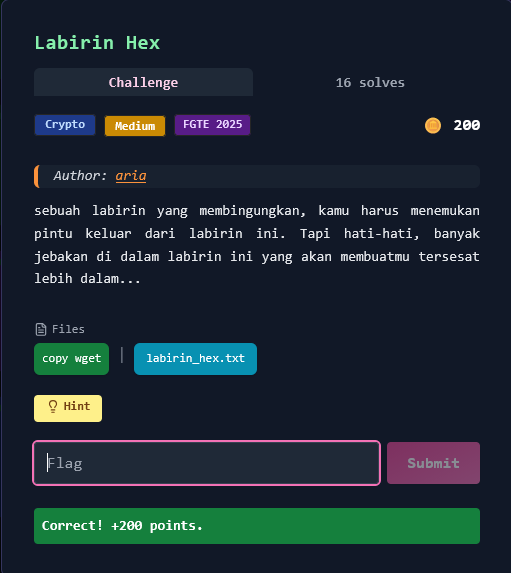
Challenge Overview
Category: Crypto
Difficulty: Medium
Author: aria
Sebuah labirin yang membingungkan dengan banyak jebakan yang membuat tersesat lebih dalam. Challenge ini melibatkan multiple layers of hex encoding dengan distraksi berupa data junk, dan menggunakan XOR cipher untuk mendapatkan flag.
Hint: "cari kunci dan gunakan xor untuk keluar"
Format flag:
FGTE{...}
Files Given
1. Ciphertext (labirin_hex.txt)
File ASCII text berukuran 65512 bytes yang berisi hex-encoded data dengan banyak layer encoding dan distraksi.
Sample awal:
64 65 63 6f 64 65 20 69 6e 69 20 64 65 6e 67 61 6e 20 6d 65 74 6f 64 65 20 79 61 6e 67 20 73 61 6d 61 2e 2e 2e 0a 0a 36 63 20 36 31 20 36 37 20 36 39...
Sample akhir:
...33 20 33 30 20 32 30 20 33 30 20 36 31 20 30 61 0a
Key Insight
Multi-Layer Hex Encoding + XOR Cipher
Challenge ini menggunakan teknik nested hex encoding (hex di dalam hex berkali-kali) dengan banyak decoy/distraksi untuk menyesatkan, dan akhirnya menggunakan XOR cipher dengan kunci yang tersembunyi di dalam layer.
Analisis:
- File berisi hex bytes yang jika di-decode menghasilkan teks berisi hex lagi
- Ada banyak pesan distraksi seperti "decode this for get flag / key: junk", "trash", "buntu"
- Di dalam layer, tersembunyi Base64-encoded key untuk XOR
- Key Base64:
a2VsdWFyX2RhcmlfbGFiaXJpbg==→ decode menjadikeluar_dari_labirin - Setelah dapat key, cari ciphertext yang di-XOR dengan key tersebut
Kesimpulan: Harus melakukan recursive hex decoding hingga menemukan key, kemudian XOR decrypt ciphertext dengan key untuk mendapatkan flag dalam format hex yang perlu di-decode lagi.
Solution Steps
Step 1 – First Layer Hex Decode
Decode hex pertama untuk mendapatkan ASCII text:
import re

def hex_tokens_to_bytes(s: str) -> bytes:
    toks = re.findall(r'\b[0-9a-fA-F]{2}\b', s)
    return bytes(int(t, 16) for t in toks)

with open("labirin_hex.txt") as f:
    raw = f.read()

layer = hex_tokens_to_bytes(raw)
Hasil: Text yang berisi pesan "decode ini dengan metode yang sama..." dan hex lagi di dalamnya
Step 2 – Recursive Hex Decoding
Decode hex berkali-kali (sekitar 8 layer) hingga menemukan Base64 key:
for _ in range(8):
    txt = layer.decode("utf-8", errors="ignore")
    toks = re.findall(r'\b[0-9a-fA-F]{2}\b', txt)
    if len(toks) < 50:
        break
    layer = bytes(int(t, 16) for t in toks)
Step 3 – Extract Base64 Key
Cari pattern Base64 dalam text hasil decode:
import base64

txt = layer.decode("utf-8", errors="ignore")
key_b64 = re.search(r'[A-Za-z0-9+/]{20,}={0,2}', txt).group(0)
# Found: a2VsdWFyX2RhcmlfbGFiaXJpbg==
key = base64.b64decode(key_b64)
# key = b'keluar_dari_labirin'
Step 4 – Find Ciphertext
Cari hex run yang panjang dan memiliki entropy tinggi (banyak byte non-printable) sebagai kandidat ciphertext:
runs = re.finditer(r'(?:\b[0-9a-fA-F]{2}\b\s*){50,}', txt)
candidates = []

for m in runs:
    ct = hex_tokens_to_bytes(txt[m.start():m.end()])
    # Heuristic: ciphertext punya banyak non-printable bytes
    printable_ratio = sum(32 <= b <= 126 or b in (9,10,13) for b in ct) / len(ct)
    candidates.append((printable_ratio, ct))

# Ambil yang paling rendah printable ratio-nya
_, ciphertext = sorted(candidates, key=lambda x: x[0])[0]
Step 5 – XOR Decrypt
XOR ciphertext dengan key untuk mendapatkan plaintext:
def xor(data: bytes, key: bytes) -> bytes:
    return bytes(b ^ key[i % len(key)] for i, b in enumerate(data))

plaintext = xor(ciphertext, key)
Step 6 – Final Hex Decode
Plaintext hasil XOR masih dalam format hex, decode sekali lagi:
pt_txt = plaintext.decode("utf-8", errors="ignore")
flag_bytes = hex_tokens_to_bytes(pt_txt)
flag = flag_bytes.decode("utf-8", errors="ignore")

print(flag)
Solve Script
#!/usr/bin/env python3
import re, base64
from pathlib import Path

def hex_tokens_to_bytes(s: str) -> bytes:
    toks = re.findall(r'\b[0-9a-fA-F]{2}\b', s)
    return bytes(int(t, 16) for t in toks)

def xor(data: bytes, key: bytes) -> bytes:
    return bytes(b ^ key[i % len(key)] for i, b in enumerate(data))

# Read file
raw = Path("labirin_hex.txt").read_text()

# Layer 0: hex -> bytes (ASCII)
layer = hex_tokens_to_bytes(raw)

# Recursive hex decoding (sampai ketemu base64 key)
for _ in range(8):
    txt = layer.decode("utf-8", errors="ignore")
    toks = re.findall(r'\b[0-9a-fA-F]{2}\b', txt)
    if len(toks) < 50:
        break
    layer = bytes(int(t, 16) for t in toks)

txt = layer.decode("utf-8", errors="ignore")

# Extract Base64 key
key_b64 = re.search(r'[A-Za-z0-9+/]{20,}={0,2}', txt).group(0)
key = base64.b64decode(key_b64)
print(f"[+] Key found: {key.decode()}")

# Find ciphertext (hex run dengan entropy tinggi)
runs = re.finditer(r'(?:\b[0-9a-fA-F]{2}\b\s*){50,}', txt)
candidates = []

for m in runs:
    ct = hex_tokens_to_bytes(txt[m.start():m.end()])
    printable_ratio = sum(32 <= b <= 126 or b in (9,10,13) for b in ct) / max(1, len(ct))
    candidates.append((printable_ratio, ct))

# Ambil yang paling kecil printable ratio-nya (= ciphertext)
_, ciphertext = sorted(candidates, key=lambda x: x[0])[0]

# XOR decrypt
plaintext = xor(ciphertext, key)

# Final hex decode
pt_txt = plaintext.decode("utf-8", errors="ignore")
flag_bytes = hex_tokens_to_bytes(pt_txt)
flag = flag_bytes.decode("utf-8", errors="ignore")

print(f"[+] Flag: {flag}")
Output:
[+] Key found: keluar_dari_labirin
[+] Flag: FGTE{k3Lu4r_d4R1_l4b1r1n_h3x_d4N_x0R}
Conclusion
Challenge ini menggunakan nested hex encoding dengan multiple layers dan banyak decoy data untuk menyesatkan solver. Teknik yang digunakan:
- Recursive hex decoding (8+ layers)
- Base64-encoded XOR key tersembunyi di dalam layer
- XOR cipher untuk enkripsi final
- Final hex encoding pada flag
Kunci sukses adalah tidak terjebak distraksi (junk, trash, buntu) dan fokus mencari pattern Base64 untuk key, kemudian menggunakan entropy analysis untuk membedakan ciphertext dari noise.
Pelajaran: Dalam challenge berlayer banyak, gunakan recursive/iterative decoding dan cari pattern kunci (seperti Base64, high entropy data) untuk membedakan data penting dari distraksi.
More
Related in Cyber/CTF
Beberapa project lain di kategori yang sama.